Technical Specifications – S220-24P4X
| Switching capacity | 128 Gbit/s |
|---|
| Packet forwarding rate | 95 Mpps |
|---|
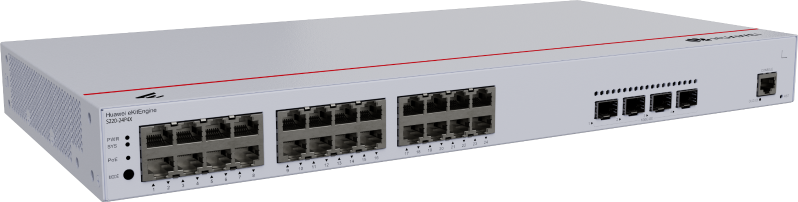
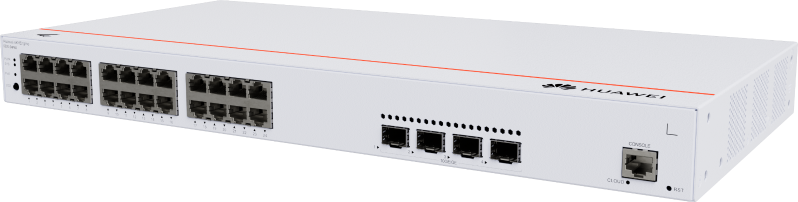
| GE RJ45 | 24 (PoE+) (1G/100M/10M) |
|---|
| 10G SFP+ | 4 (10G/1G) |
|---|
| PoE | Supported |
|---|
| Maximum PoE power consumption [W] | 400 |
|---|
| Number of fans modules | 2 |
|---|
| Certification | EMC certification Safety certification Manufacturing certification |
|---|
| Chassis material | Metal |
|---|
| Static power consumption [W] | 27.07 |
|---|
| Dimensions without packaging (H x W x D) [mm(in.)] | Basic dimensions (excluding the parts protruding from the body): 43.6 mm x 442.0 mm x 220.0 mm (1.72 in. x 17.4 in. x 8.66 in.) Maximum dimensions (the depth is the distance from ports on the front panel to the parts protruding from the rear panel): 43.6 mm x 442.0 mm x 227.0 mm (1.72 in. x 17.4 in. x 8.94 in.) |
|---|
| Dimensions with packaging (H x W x D) [mm(in.)] | 90.0 mm x 550.0 mm x 360.0 mm (3.54 in. x 21.65 in. x 14.17 in.) |
|---|
| Installation type | Rack mounting,Desk mounting,Wall mounting |
|---|
| Weight without packaging [kg(lb)] | 2.92 kg (6.44 lb) |
|---|
| Weight with packaging [kg(lb)] | 3.79 kg (8.36 lb) |
|---|
| Typical power consumption [W] | 37.12 |
|---|
| Maximum power consumption [W] | - Without PoE: 44.35 W - Full PoE load: 485.91 W (PoE: 400 W) |
|---|
| Long-term operating temperature [°C(°F)] | -5°C to +50°C (23°F to 122°F) at an altitude of 0-1800 m (0-5905.44 ft.) |
|---|
| Long-term operating relative humidity [RH] | 5% RH to 95% RH, non-condensing |
|---|
| Power supply mode | AC built-in |
|---|
| Types of fans | Built-in |
|---|
| Input voltage range [V] | - AC input: 90 V AC to 290 V AC; 45 Hz to 65 Hz - High-voltage DC input: 190 V DC to 290 V DC |
|---|
| Power supply surge protection [kV] | Differential mode: ±6 kV; common mode: ±6 kV |
|---|
| Heat dissipation mode | Air cooling for heat dissipation, intelligent fan speed adjustment |
|---|
Source: Huawei eKit official website. Specifications are subject to change by the manufacturer.
![[S220-24P4X] Huawei eKit S220-24P4X 24-Port Gigabit PoE+ Managed Switch, 4 x 10GE SFP+, 400W](/web/image/product.image/957/image_1024/%5BS220-24P4X%5D%20Huawei%20eKit%20S220-24P4X%2024-Port%20Gigabit%20PoE%2B%20Managed%20Switch%2C%204%20x%2010GE%20SFP%2B%2C%20400W?unique=6800dea)

![[S220-24P4X] Huawei eKit S220-24P4X 24-Port Gigabit PoE+ Managed Switch, 4 x 10GE SFP+, 400W](/web/image/product.image/957/image_128/%5BS220-24P4X%5D%20Huawei%20eKit%20S220-24P4X%2024-Port%20Gigabit%20PoE%2B%20Managed%20Switch%2C%204%20x%2010GE%20SFP%2B%2C%20400W?unique=6800dea)