Overview of Grandstream GWN7822P
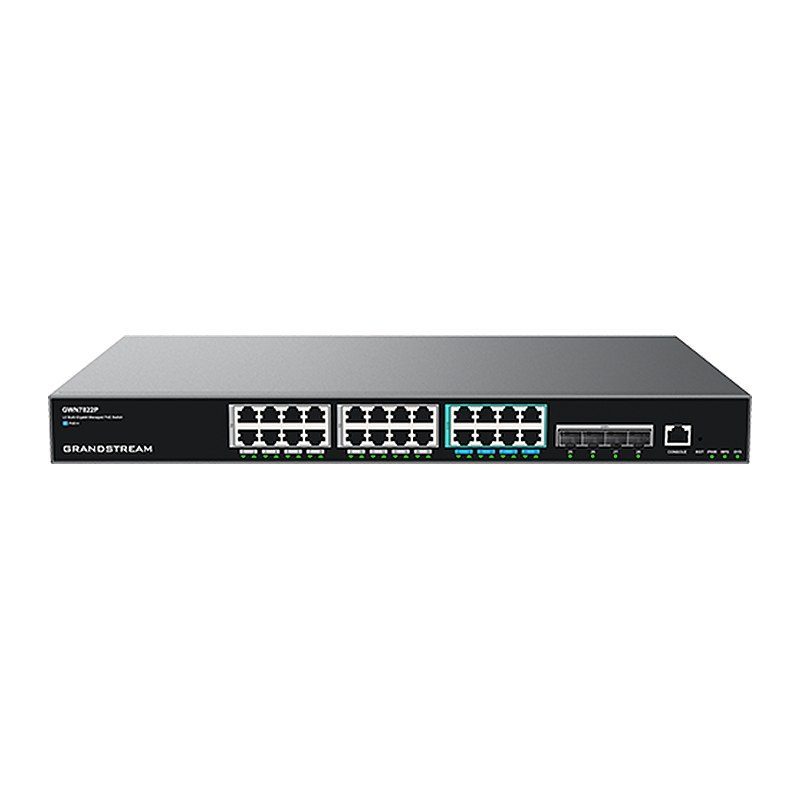
The Grandstream GWN7822P is a Layer 3 multi-gigabit managed PoE switch from the GWN7820 series, designed for medium-to-large enterprises that need scalable, secure and high-performance networks. It provides 16 1G ports, 8 2.5G ports and 4 10G SFP+ uplinks, with PoE/PoE+/PoE++ on all 24 ports (60 W on ports 17-24) and a 360 W total budget, ideal for powering Wi-Fi access points, IP cameras and IP phones. Advanced VLANs, QoS, IGMP/MLD Snooping, static and dynamic routing and comprehensive security are included, with stacking of up to 4 devices. Manage it via web UI, CLI, GDMS Networking, GWN Manager or GWN routers in offices, hotels, schools and warehouses.
Technical Specifications – Grandstream GWN7822P
General
| Network Protocols | IPv4, IPv6, IEEE 802.3, IEEE 802.3i, IEEE 802.3u, IEEE 802.3ab, IEEE 802.3z, IEEE 802.3ae, IEEE 802.3az, IEEE 802.3ad, IEEE 802.3x, IEEE 802.3af/at/bt, IEEE 802.1p, IEEE 802.1Q, IEEE 802.1d, IEEE 802.1w, IEEE 802.1s, IEEE 802.1x |
|---|
| Memory | 256MB RAM, 8MB Nor Flash, 128MB Nand Flash |
|---|
| Jumbo Frame (Bytes) | 12288 |
|---|
Ports
| Gigabit Ports | 16x 1G, 8x 2.5G |
|---|
| SFP+ Ports | 4 (to support DAC, cable must be ≤ 5m) |
|---|
| Maximum No. of Supported Modules | SM-10G: 4; MM-10G: 4; RJ45-10G: 2 (RJ45-10G modules must be interval inserted) |
|---|
| Console | 1 |
|---|
| Auxiliary Ports | 1 × Reset Pinhole |
|---|
| Link Aggregation Groups | 32 |
|---|
Power & PoE
| PoE Standards | IEEE 802.3af/at/bt |
|---|
| PoE Ports | 24 |
|---|
| Integrated Power Supply | 420W (54V/7.78A) |
|---|
| External Redundant Power Supply (RPS) | 54V (300W) (optional) |
|---|
| Max Output Power per PoE Port | 30W for port 1-16, 60W for port 17-24 |
|---|
| Max Total PoE Output Power | 360W |
|---|
| Surge Protection | ±6 kV CM and DM for power; ±4 kV CM for network ports |
|---|
| ESD | ±12 kV for contact discharge |
|---|
Performance
| Forwarding Mode | Store-and-forward |
|---|
| Total Non-Blocking Throughput | 76Gbps |
|---|
| Switching Capability | 152Gbps |
|---|
| Forwarding Rate | 113.088Mpps |
|---|
| Packet Buffer | 12Mb |
|---|
| Network Latency | <4 µs |
|---|
| Stacking | Yes, up to 4 devices |
|---|
Software Features
| Switching | 16K MAC addresses, including static, dynamic and filtering MAC address; 4K VLANs, port-based VLAN, IEEE 802.1Q VLAN tagging, MAC-based VLAN, protocol-based VLAN; Voice VLAN including auto voice VLAN, tagged OUI and untagged OUI; Private VLAN; 16 VLAN virtual interface with 9216 MTU; GVRP (pending); 1K ARP/NDP; Spanning tree, 32 instances for STP/RTSP/MSTP/PVST(+)/RPVST(+); ERPS (pending) |
|---|
| Routing | 512 (IPv4)/128 (IPv6) routes; 32 (IPv4)/32 (IPv6) static routing; Policy routing (pending); Dynamic routing, including RIP, RIPng, OSPF, OSPFv3, BGP and IS-IS (pending); Routing Policy; VRRP (pending) |
|---|
| Multicast | IGMP Snooping with IGMPv2 and IGMPv3, 256 IGMP Snooping groups; MLD Snooping with MLDv1 and MLDv2, 256 MLD Snooping groups; MVR |
|---|
| QoS/ACL | Port priority; Priority mapping; Queue scheduling, including SP, WRR, WFQ, SP-WRR and SP-WFQ; Traffic shaping; Rate limit; 2K ACL for Ethernet, IPv4 and IPv6 |
|---|
| DHCP | DHCP server, DHCP relay, DHCP Option 82, 60, 160 and 43 |
|---|
| Maintenance | CPU and memory monitoring; Fault detection and alarm for power supply and fan; SNMP including SNMPv1, SNMPv2c, SNMPv3; RMON; LLDP & LLDP-MED; Backup and restore; Syslog; Diagnostics including Ping, Traceroute, Mirroring including SPAN and RSPAN, UDLD (pending) and copper test; Upgrade via FTPS / TFTP / HTTP / HTTPS or local upload, mass provisioning using DHCP Option / TR-069 (pending) / GDMS Networking / GWN Manager / GWN Series Routers |
|---|
| Security | User hierarchical management and password protection, HTTPS, SSH, Telnet; Identity authentication including 802.1X and MAC authentication; AAA authentication including RADIUS, TACACS+; Storm control; Port isolation, port security, sticky MAC; Filtering MAC address; IP/IPv6 source guard, DoS attack prevention, ARP inspection; DHCP/DHCPv6 Snooping; Loop protection including BPDU protection, root protection and loopback protection; Kensington Security Slot (Kensington Lock) support |
|---|
Physical & Environmental
| Mounting | Desktop, or Rack-Mount (rack-mounting kits included) |
|---|
| System LEDs | 1x tri-color LED for device tracking and status indication |
|---|
| Power Supply LEDs | 2x green-color LEDs for per power supply PWR&RPS |
|---|
| PoE Powered LEDs | 24x yellow-color LEDs |
|---|
| Data Transferring LEDs | 28x green-color LEDs |
|---|
| Fan | 2 |
|---|
| Environmental | Operating: 0 °C to 45 °C, humidity 10–90% RH non-condensing; Storage: -10 °C to 60 °C, humidity 10–90% RH non-condensing |
|---|
| Dimensions | 440mm (L) × 300mm (W) × 44mm (H) |
|---|
| Unit Weight | 4.1 kg |
|---|
| Package Content | 1x Switch; 1x 1.2m AC Cable; 1x 25cm Ground Cable; 4x Rubber Footpads; 1x Power Cord Anti-Trip; 2x Rack-Mounting Kits; 1x RPS, External Redundant Power Supply (Optional); 8x Screws (KM 3*6); 1x Simplified Quick Installation Guide; 1x Regulatory Paper |
|---|
| Compliance | FCC, CE, RCM, IC |
|---|
Source: Grandstream official website and datasheet. Specifications are subject to change by the manufacturer.