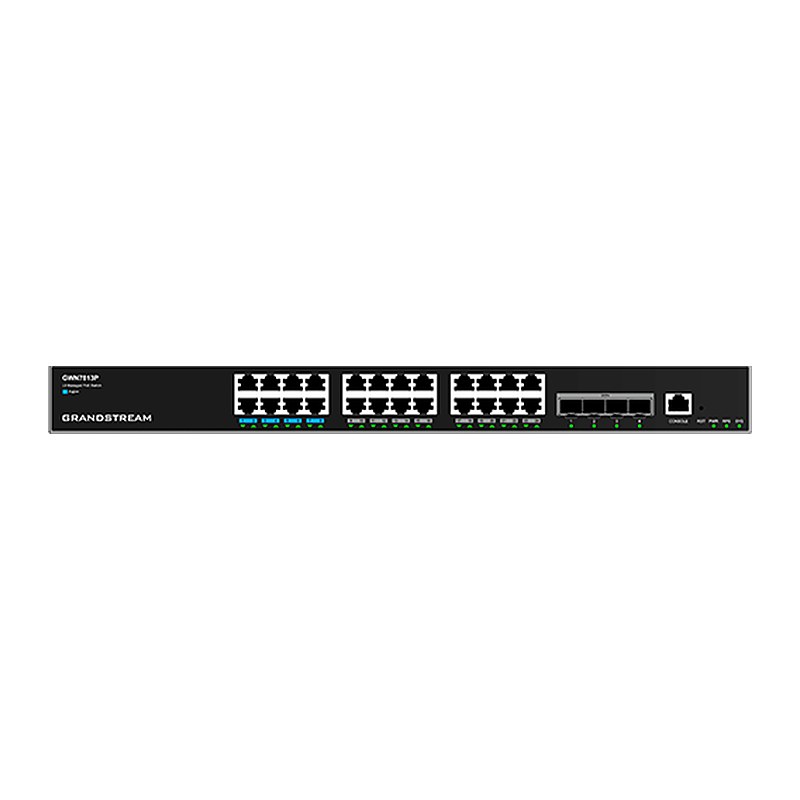
Overview of Grandstream GWN7813P
The Grandstream GWN7813P is an enterprise Layer 3 managed network switch from the GWN7810 series, built for medium-to-large businesses that need scalable, secure and high-performance networks. It provides 24 Gigabit Ethernet ports and 4 10G SFP+ ports with up to 128 Gbps switching capacity. Its 24 PoE ports deliver smart, dynamic power to IP phones, IP cameras and Wi-Fi access points with a 370 W total budget, and ports 1-8 support PoE++ up to 60 W. Static and dynamic routing, advanced VLANs, QoS, IGMP/MLD Snooping and comprehensive security features are included, and up to 4 switches can be stacked. Manage it via web UI, CLI, GDMS Networking, GWN Manager or GWN routers in offices, hotels, schools, hospitals and warehouses.
Technical Specifications – Grandstream GWN7813P
General
| Network Protocols | IPv4, IPv6, IEEE 802.3, IEEE 802.3i, IEEE 802.3u, IEEE 802.3ab, IEEE 802.3z, IEEE 802.3ae, IEEE 802.3x, IEEE 802.1p, IEEE 802.1Q, IEEE 802.1w, IEEE 802.1d, IEEE 802.1s, IEEE 802.3az, IEEE 802.3ad, IEEE 802.3AB, IEEE 802.1D, IEEE 802.1x |
|---|
| Memory | 256MB RAM, 128MB Nand Flash, 8MB Nor Flash |
|---|
| Jumbo Frame (Bytes) | 12288 |
|---|
Ports
| Gigabit Ethernet Ports | 24 |
|---|
| 10G SFP+ Ports | 4 (supports DAC cable, must be ≤ 5 m) |
|---|
| Maximum No. of Supported Modules | SM-10G: 4; MM-10G: 4; RJ45-10G: 2 |
|---|
| Console | 1 |
|---|
| Auxiliary Ports | 1 × Reset Pinhole |
|---|
| Link Aggregation Groups | 32 |
|---|
Power & PoE
| PoE Standards | IEEE 802.3af/at/bt |
|---|
| PoE Ports | 24 |
|---|
| Max Output Power per PoE Port | 60 W (ports 1-8, PoE++); 30 W (ports 9-24) |
|---|
| Max Total PoE Output Power | 370 W |
|---|
| External Redundant Power Supply (RPS) | 54V (300W) (optional) |
|---|
| Surge Protection | ±6 kV CM and DM for power; ±4 kV CM for network ports |
|---|
| ESD | ±12 kV for contact discharge |
|---|
Performance
| Forwarding Mode | Store-and-forward |
|---|
| Total Non-Blocking Throughput | 64 Gbps |
|---|
| Switching Capability | 128 Gbps |
|---|
| Forwarding Rate | 95.232 Mpps |
|---|
| Packet Buffer | 12MB |
|---|
| Network Latency | <4 µs |
|---|
| Stacking | Yes, up to 4 devices |
|---|
Software Features
| Switching | 16K MAC addresses, including static, dynamic, filtering and sticky MAC address; 4K VLANs, port-based VLAN, IEEE 802.1Q VLAN tagging, MAC-based VLAN, protocol-based VLAN, QinQ; Private VLAN; Voice VLAN including auto voice VLAN, tagged OUI and untagged OUI; 16 VLAN virtual interface with 9216 MTU; GVRP (pending); Spanning tree, 32 instances for STP/RTSP/MSTP/PVST(+)/RPVST(+); 1K ARP/NDP |
|---|
| Routing | 512 (IPv4)/128 (IPv6) routes; 32 (IPv4)/32 (IPv6) static routing; Dynamic routing, including RIP, RIPng, OSPF, OSPFv3 and BGP; Routing Policy |
|---|
| Multicast | IGMP Snooping with IGMPv2 and IGMPv3, 256 IGMP Snooping groups; MLD Snooping with MLDv1 and MLDv2, 256 MLD Snooping groups; MVR |
|---|
| QoS/ACL | Port priority; Priority mapping; Queue scheduling, including SP, WRR, WFQ, SP-WRR and SP-WFQ; Traffic shaping; Rate limit; 2K ACL for Ethernet, IPv4 and IPv6 |
|---|
| DHCP | DHCP server, DHCP relay, DHCP Option 82, 60, 160 and 43 |
|---|
| Maintenance | Fan and PWR/RPS monitoring; CPU and memory monitoring; SNMP including SNMPv1, SNMPv2c, SNMPv3; RMON; LLDP & LLDP-MED; Backup and restore; Syslog; Diagnostics including Ping, Traceroute, Mirroring including SPAN and RSPAN, UDLD (TBD) and copper test; Upgrade via FTPS / TFTP / HTTP / HTTPS or local upload, mass provisioning using DHCP Option / TR-069 (pending) / GDMS Networking / GWN Manager / GWN Series Routers |
|---|
| Security | User hierarchical management and password protection, HTTPS, SSH, Telnet; 802.1X authentication; MAC authentication; AAA authentication including RADIUS, TACACS+; Storm control; Port isolation, port security, sticky MAC; Filtering MAC address; IP/IPv6 source guard, DoS attack prevention, ARP inspection; DHCP/DHCPv6 Snooping; Loop protection including BPDU protection, root protection and loopback protection; Kensington Security Slot (Kensington Lock) support |
|---|
Physical & Environmental
| Mounting | Desktop, Wall-Mount, or Rack-Mount (rack-mounting kits included) |
|---|
| System LEDs | 1x tri-color LED for device tracking and status indication |
|---|
| Power Supply LEDs | 2x bi-color LEDs for per power supply PWR&RPS |
|---|
| Data Transferring LEDs | 28x green-color LEDs |
|---|
| PoE Powered LEDs | 24x yellow-color LEDs |
|---|
| Fan | 3 |
|---|
| Environmental | Operating: 0 °C to 45 °C, humidity 10–90% RH non-condensing; Storage: -10 °C to 60 °C, humidity 5–95% non-condensing |
|---|
| Dimensions | 440 mm (L) × 300 mm (W) × 44 mm (H) |
|---|
| Unit Weight | 4.69 kg |
|---|
| Package Content | 1x Switch; 1x 1.2m (10A) AC Cable; 1x 25cm Ground Cable; 4x Rubber Footpads; 1x Power Cord Anti-Trip; 8x Screws (KM 3*6); 1x Quick Installation Guide; 1x Console Cable (Optional); 2x Rack-Mounting Kits; 1x RPS, External Redundant Power Supply (Optional) |
|---|
| Compliance | FCC, CE, RCM, IC, UKCA |
|---|
Source: Grandstream official website and datasheet. Specifications are subject to change by the manufacturer.