Skip to Content
  • Delivery in 4–10 working days across Saudi Arabia
  • A tax invoice with every order
  • Technical support before and after you buy

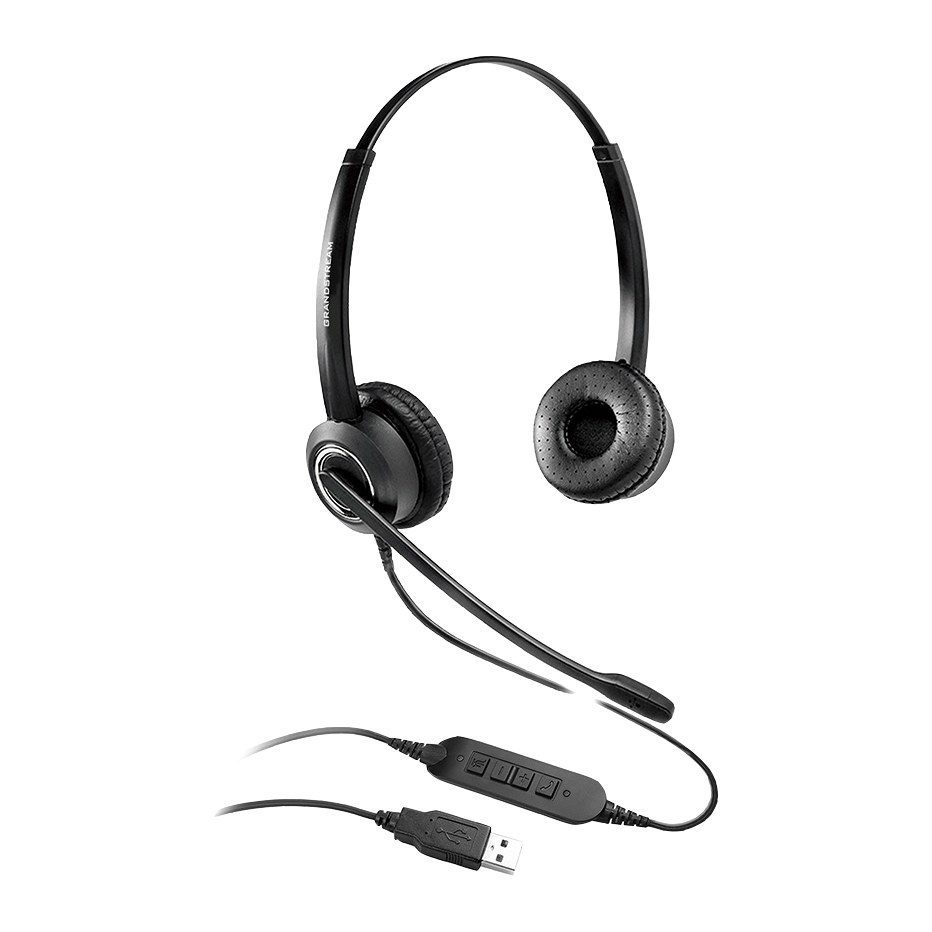
Grandstream GUV3000 HD USB Headset, Noise-Canceling Mic, USB-A, In-Line Controls

Part number GUV3000
  • HD audio for crystal clear and easy communication
  • Noise canceling technology to minimize background noise
  • USB 2.0 (USB-A) connection for laptops, desktop computers and Grandstream IP phones
  • Adjustable headband for all day comfort; left or right wearing style
  • In-line controls for quick and easy control of volume and mute
  • Compatible with major communication platforms and softphones such as Zoom, Teams, Slack, WebEx, IPVideoTalk and Grandstream Wave
Price
⃁ 84.37 ⃁ 84.37 ⃁ 109.86 Save 23%
⃁ 84.37 ⃁ 109.86
(Tax excluded)
  • Delivery within 4–10 business days across Saudi Arabia
  • Warranty according to the manufacturer
  • Tax invoice with every order
  • Technical support before and after purchase

Not sure this model fits your setup? Read the buying guide
Overview of Grandstream GUV3000

The Grandstream GUV3000 is an HD USB headset that pairs with laptops, computers, IP phones and other devices to offer high-quality sound. Its noise cancellation microphone minimizes background noise to provide crisp HD audio, while the adjustable headband, soft ear cushions and in-line volume and mute controls keep users comfortable all day. The GUV3000 connects through USB-A and works with any device that offers a USB connection, including Grandstream IP phones, and supports major third-party communication platforms, apps and softphones as well as Grandstream IPVideoTalk Meetings and the Wave app. It suits remote workers, call centers, receptionists and sales teams in busy offices.

Technical Specifications – Grandstream GUV3000

General

Connection TypeUSB2.0, USB-A
Wearing StyleAdjustable headband

Speaker

Speaker Diameter27mm
Impedance150(±15%)Ω
Sensitivity95±3dB (at 1kHz 1mW)
Frequency Response100Hz~7kHz
DistortionMax: 3% & 1kHz
Default Input Power10mW
Maximum Input Power20mW
L/R Volume Level Difference Average≤3dB (at 1kHz 1mW)

Microphone

DimensionΦ4.0*2.2 mm
Output Impedance<2.2 kΩ
Sensitivity-47±3dB f=1kHz, Pin=1 Pa
SNR≥55dB f=1kHz, Pin=1Pa, A-Weighted Curve
Frequency Response150Hz~6.8kHz
DirectivityCardioid
Microphone Boom Arm Rotation310˚

Additional Features

Busy-LightNo
Application CompatibilitySupport popular communication applications (such as Zoom, Teams, Slack, WebEx, IPVideoTalk, Grandstream Wave, Counterpath, 3CX soft phones) and IP phone devices

Environmental

TemperatureStorage: -40˚C ~ 70˚C; Operating: -10˚C ~ 50˚C

Physical

Weight125g
Cable Length2 meters

Package

PackagingHeadset, Quick User Guide

Compliance

CertificationsCE, FCC

Source: Grandstream official website and datasheet. Specifications are subject to change by the manufacturer.

PRACTICAL ANSWERS

IP phone questions

How do I choose an IP phone for an employee?

Start with the person’s daily call workflow, required keys, headset use and desk connectivity. Check the exact model against the PBX and provisioning method rather than selecting only by screen size or appearance.

Does an IP phone need a separate power adapter?

Check the phone’s supported power options, what is included in the package and the capabilities of the connected switch. Confirm that the complete proposed arrangement can power every phone, not just a single test device.

Will my headset work with the new phone?

Compare the headset and phone model numbers, connector type and any required adapter or call-control support. Ask to test answering, ending and muting a call with the intended combination before equipping a team.

Can a phone be used by a remote employee?

Confirm the PBX’s supported remote deployment method and the employee’s network requirements. Plan secure provisioning and support responsibilities; do not expose administration interfaces or assume a phone can be moved without configuration.

How should I compare phone models for a reception desk?

List the extensions the receptionist handles, the required transfer workflow and any need for expansion keys or a headset. Evaluate the full workflow with the PBX, including the features actually licensed and supported.

What should I check before deploying many IP phones?

Test a small representative group first, then review network ports, power, provisioning, user labels and the rollback plan. Keep an inventory linking each physical device to its intended user or location.