Skip to Content

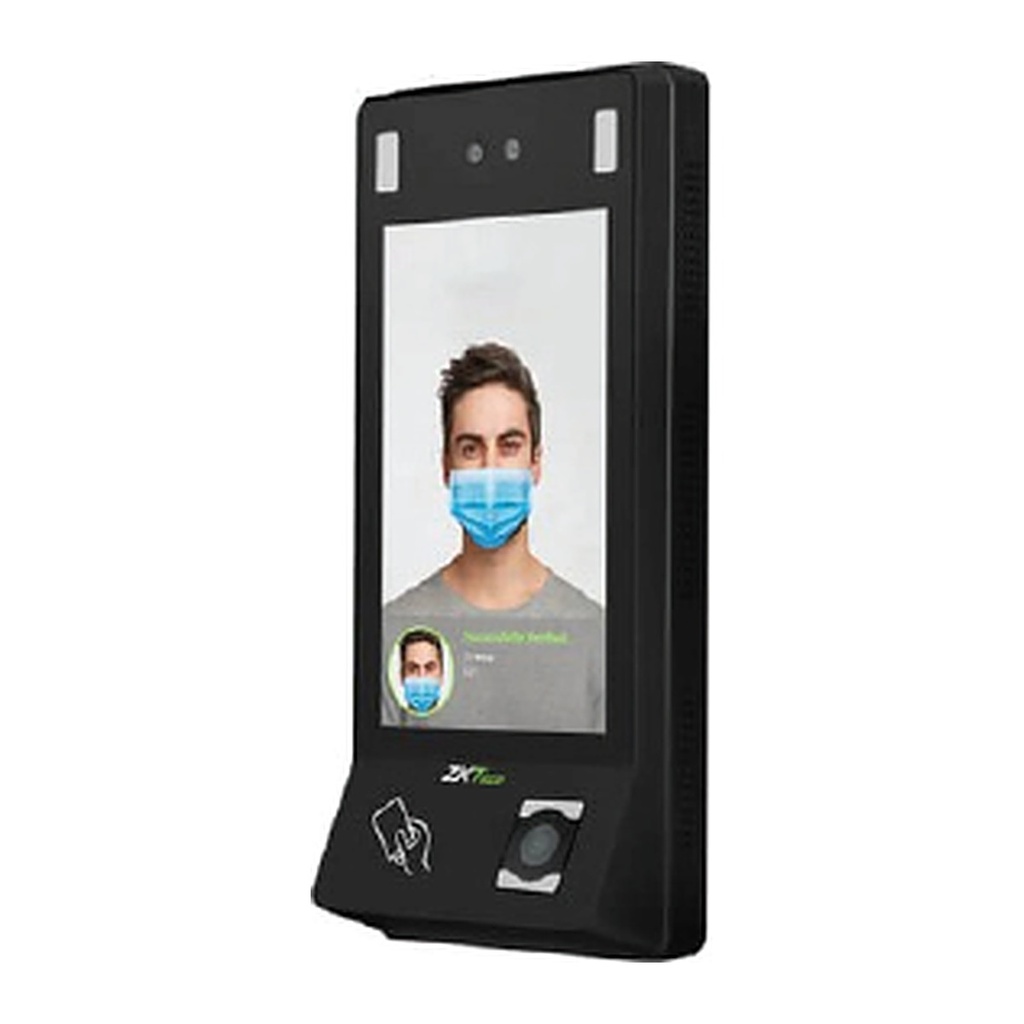
ZKTeco G4 PRO Android Face Recognition Access Terminal, 7" Touch, QR, PoE, 4G Optional

  • Facial recognition access control terminal with 7-inch touch screen and 2MP binocular camera
  • Optional 4G network compatibility
  • Scans T&A/A&C dynamic QR codes from the ZKBio CVSecurity Mobile App
  • Open Supervised Device Protocol (OSDP v2.1.7)
  • Dual-frequency (125kHz and 13.56MHz) card module as standard, multi-tech card module optional
  • Android LCDP for third-party application integration
  • IEEE 802.3af/at PoE power supply
  • Mask detection
  • Anti-spoofing algorithm against print attacks (laser, color and B/W photos) and video attacks
Price
⃁ 3,066.67 ⃁ 3,066.67 ⃁ 3,833.34
(Tax excluded)
  • Delivery within 2–5 business days across Saudi Arabia
  • Warranty according to the manufacturer
  • Tax invoice with every order
  • Technical support before and after purchase

Not sure this model fits your setup? Read the buying guide

Technical Specifications – G4 PRO

Capacity50,000 Users 50,000 Faces 50,000 Cards 1,000,000 Transactions
CPU64bit Octa- core Customized Computer Vision 1.8GHz CPU
Storage2GB LPDDR3 16GB eMMC
Screen Type7-inch Touch Screen 720*1280 Pixels
Camera2MP Binocular Camera
CommunicationTCP/IP, USB Host, RS485*, Wiegand Input, Wiegand Output, Wi-Fi, Bluetooth, 4G(optional) WLAN: 2.4G, 802.11 b/g/n Bluetooth: BT2.1+EDR/3.0/4.1 LE/4.2 BLE LTE FDD: B1/B2/B3/B4/B5/B7/B8/B20/B28 LTE TDD: B38/B39/B40/B41 WCDMA: B1/B2/B4/B5/B8 GSM: 1800/1900MHz Note: RS485 is for RS485 readers
Access Control InterfaceRS485 (OSDP v2.1.7), Wiegand In/Out, Lock Relay Output, Exit Button, Alarm Output, Auxiliary Input, Door Sensor, External Bell
Card Type125kHz ID card & 13.56MHz IC card Multi-tech Card Module (optional)
QR Code ScannerDynamic QR codes on the ZKBio CVSecurity mobile application QR code, PDF417, Data Matrix, MicroPDF417, Aztec scanning in third-party development projects
FingerprintZ-ID Fingerprint Sensor 30,000 Fingerprints (optional)
AlgorithmZKFace 5.6.2 ZKFinger 10.0
Operating Temperature-20°C to 55°C (-4°F to 131°F)
Operating Humidity<90%RH
Storage Temperature-25°C to 65°C (-13°F to 149°F)
Storage Humidity<90%
Dimensions (L * W * H)264mm*120mm*51mm (9.69in*4.72in*2in)
Facial Recognition Speed≤ 1s
Facial Recognition Distance0.3m to 1.2m
Power SupplyDC 12V, 3A IEEE 802.3af / at
Standard Firmware FunctionsPush, Schedule Bell, Automatic Status Switch, Record Query, Access Levels, Groups, Holidays, DST, Duress Mode (Password & Fingerprint), Anti-Passback, Customization of Wallpaper & Screen Saver
Supported SoftwareZKBio Time (Only Time & Attendance Firmware) ZKBio CVSecurity
CertificationsCE, FCC, ISO9001, ISO14001, ISO20000

Source: ZKTeco official website. Specifications are subject to change by the manufacturer.

PRACTICAL ANSWERS

Access and attendance questions

Are attendance recording and door access the same requirement?

Describe them separately: recording attendance events and authorizing passage through a door can involve different devices and workflows. Confirm which functions are included in the proposed model and software, and how each will be tested.

What details are needed to select a door access system?

Provide the door types, number of users, access schedules and identification methods you need. Ask a qualified installer to check compatible locking and exit arrangements for the site, including the required emergency behavior.

Can attendance data be linked to another business system?

Check whether the exact device and software provide a supported export or integration interface. Define employee identifiers, event formats and the synchronization schedule, then test a sample before agreeing that an integration is complete.

How should user permissions be managed?

Define who can add users, change schedules, review records and administer the system. Use separate authorized accounts and document the process for employee changes and access removal rather than relying on a shared administrator account.

What happens when power or the network is interrupted?

The behavior depends on the devices, locking arrangement and configuration. Ask for the documented behavior of the proposed setup and an agreed interruption test, including record recovery and any backup-power requirement.

What should I review before collecting attendance or access records?

Define the purpose, authorized users and appropriate retention process for your organization. Review the applicable requirements with your responsible team, and do not assume that a device’s available features authorize every possible use.