Skip to Content

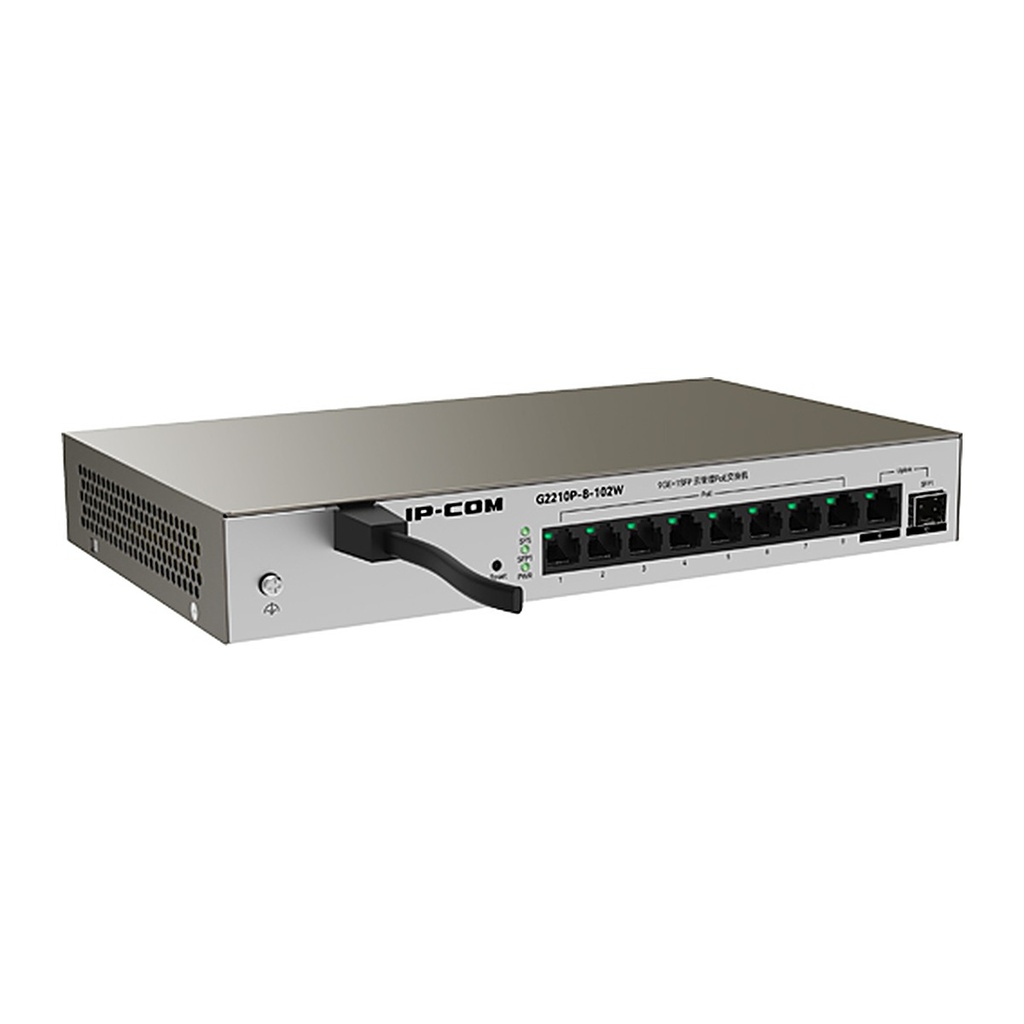
IP-COM G2210P-8-102W 10-Port Gigabit Cloud Managed PoE Switch, 8 PoE + SFP

  • 8 x Gigabit PoE ports
  • 1 x Gigabit uplink port + 1 x SFP fiber port
  • Cloud management via app and web, plus local web management
  • PoE management: live power display and per-port on/off
  • IEEE 802.1Q VLAN, port isolation and N:1 port mirroring
  • Loop prevention, storm control and rate limiting
  • 6 kV lightning protection on ports and power
Price
⃁ 306.67 ⃁ 306.67 ⃁ 383.34
(Tax excluded)
  • Delivery within 2–5 business days across Saudi Arabia
  • Warranty according to the manufacturer
  • Tax invoice with every order
  • Technical support before and after purchase

Not sure this model fits your setup? Read the buying guide

Technical Specifications – G2210P-8-102W

Network standardsIEEE 802.3, IEEE 802.3u, IEEE 802.3ab, IEEE 802.3x, IEEE 802.3z, IEEE 802.1q
LED indicators1 Link/Act LED per port; 1 PWR LED per device; 1 SYS LED per device
Fixed ports8 x 10/100/1000Base-T Ethernet ports (PoE & Data); 1 x 100/1000Base-T Ethernet port (Data); 1 x 1000Base-X SFP port
Lightning protectionPort: 6 kV; Power supply: 6 kV
Forwarding modeStore-and-forward
Switching capacity20 Gbps
Packet forwarding rate14.9 Mpps
Switching bufferN/A
MAC address table16K
Input voltage220V AC 50Hz
Dimensions (L x W x H)247 x 150 x 37 mm
EnvironmentOperating temperature: 0°C to 45°C; Storage temperature: -40°C to 70°C; Operating humidity: 10%–90% RH, non-condensing; Storage humidity: 5%–90% RH, non-condensing
CertificationsCCC, FCC, CE, RoHS
PoE managementDynamic display of used and remaining PoE power; Per-port PoE on/off setting
Security featuresMAC address + port + VLAN triple whitelist binding
VLANVLAN transparent mode supported; IEEE 802.1Q VLAN supported
DHCPDHCP client supported
Port managementPort flow control; Port isolation; N:1 port mirroring; Port statistics for received/sent, collision and CRC error packets
Loop preventionSingle-port loop prevention supported
Storm controlPort storm control supported
Rate limitingPort ingress/egress rate limiting supported
Loading and upgradeHTTP upgrade supported; Configuration import/export supported

Source: IP-COM official website. Specifications are subject to change by the manufacturer.

PRACTICAL ANSWERS

Network planning questions

Should I choose a router, a switch or an access point?

Start with the task: connecting networks, adding wired device ports, or providing wireless coverage. A single installation may need more than one device type. Share a site diagram and device list so the proposed roles and connections are clear.

Why is wireless coverage weak in some rooms?

Check the access point location, building layout, obstacles and the number of active devices. Measure coverage where people actually work before choosing extra equipment; changing the internet package alone may not address a coverage problem.

How do I select a switch for powered network devices?

List the devices to be connected and check each device’s power requirements against the switch’s per-port capability and total documented power budget. Also review uplink capacity and reserve ports for the expansion you actually expect.

Can the guest network be separated from business devices?

Define which devices and services guests should be able to reach, then check whether the router, switch and access points support the required separation. Test the resulting access rules; a different wireless network name alone is not the acceptance test.

What information helps plan a network upgrade?

Provide floor plans, current equipment models, internet connections, cabling details and peak device counts. Describe the applications that matter most and the observed problem, such as disconnections or slow local file access.

How should network performance be checked after installation?

Agree on the locations and representative workloads to test, then record wired and wireless results separately. Check connectivity, coverage and access rules during normal use, and retain a diagram and configuration backup for support.