Skip to Content
  • Delivery in 4–10 working days across Saudi Arabia
  • A tax invoice with every order
  • Technical support before and after you buy

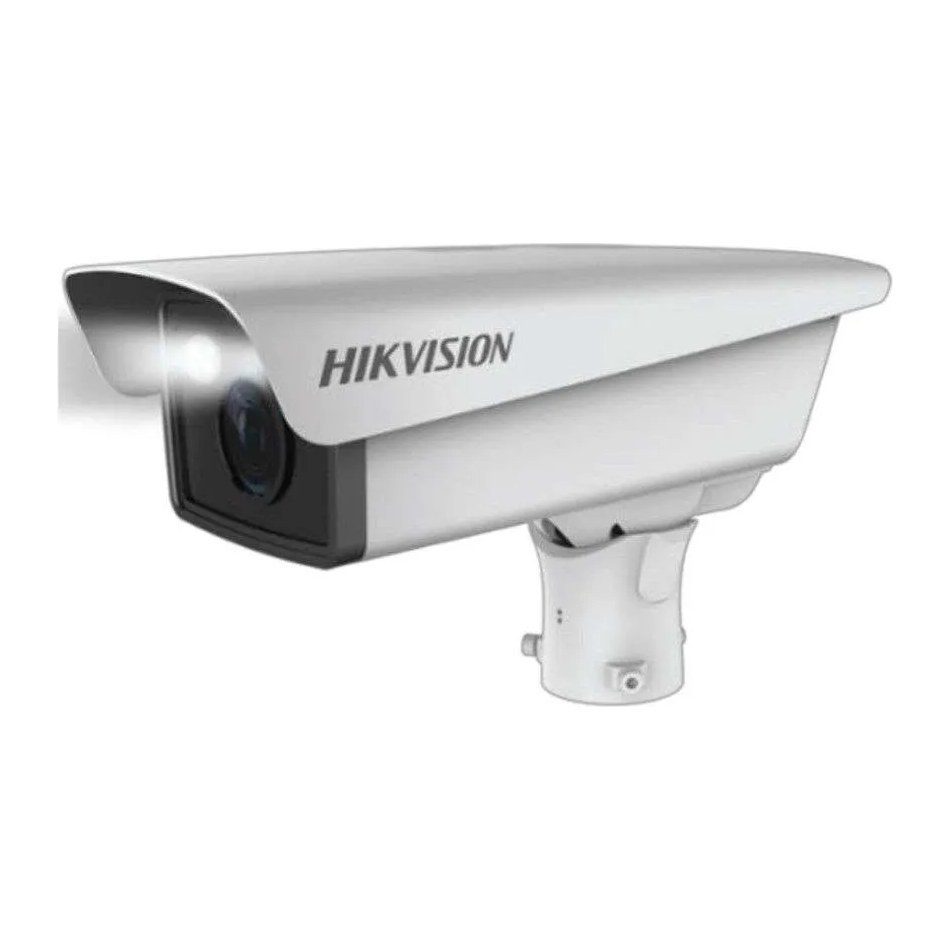
Hikvision DS-TCG205-E/4MP(12V/PoE) 4MP Entrance & Exit ANPR Camera, Motorized Varifocal Lens

Part number DS-TCG205-E/4MP(12V/PoE)
  • 4MP 1/3" progressive scan CMOS, up to 2688 × 1520 resolution
  • Multi-frame ANPR based on deep learning, with dirty-plate recognition
  • Vehicle type, color and brand recognition
  • 3.1 to 6 mm motorized varifocal lens
  • 2 built-in LEDs: IR and warm white light
  • Relay output to control the barrier gate; video, loop (I/O) or radar triggering
  • Trigger distance from 2 to 12 m
  • 12–24 VDC or PoE power, IP67 and IK10 protection

Price
⃁ 1,450.00 ⃁ 1,450.00
⃁ 1,450.00
(Tax excluded)
  • Delivery within 4–10 business days across Saudi Arabia
  • Warranty according to the manufacturer
  • Tax invoice with every order
  • Technical support before and after purchase

Not sure this model fits your setup? Read the buying guide
Technical Specifications – DS-TCG205-E/4MP(12V/PoE)

Camera

Image Sensor1/3" Progressive Scan CMOS
Max. Resolution2688 × 1520
Min. IlluminationColor: 0.022 Lux @ F1.9; B/W: 0.011 Lux @ F1.9
Shutter Time1/30 s to 1/100,000 s
Day & NightIR cut filter with blue glass module
Wide Dynamic Range140 dB
Noise Reduction3D DNR

Lens

Focal Length3.1 to 6 mm, motorized varifocal
ApertureF1.9
FocusAuto (motorized)
Field of View3.1 mm: H 105.5°, V 55.9°, D 126.9°; 6 mm: H 51.4°, V 28.9°, D 59.2°

Illuminator

Supplement Light TypeIR (850 nm) and warm white light (3000 K)
Supplement Light RangeUp to 10 m for video, 5 m for the license plate

Video

Main Stream2688 × 1520, 1920 × 1080, 1280 × 720
Sub-Stream1920 × 1080, 1280 × 720, 704 × 576 (704 × 480), 640 × 480
Frame Rate25 fps (50 Hz), 30 fps (60 Hz)
Video CompressionH.265, H.264, MJPEG
Bit Rate32 Kbps to 16 Mbps

License Plate Recognition

Trigger ModeVideo detection, I/O (loop), radar
Trigger Distance2 to 12 m
Capture Rate> 98%
Plate Recognition Accuracy> 98%
Moving Direction Accuracy> 98.5%
Supported Plate RegionsMiddle East, Africa, Asia-Pacific, Americas, Europe, Russian-speaking countries
Recognition DirectionForward, backward and bidirectional
Vehicle AttributesVehicle type, color and brand
Allowlist / BlocklistUp to 100,000 entries in total (TF card required)
Other FunctionsFake plate filter, LED auto and scheduled control

Network

ProtocolsTCP/IP, ICMP, HTTP, HTTPS, FTP, SRTP, DHCP, DNS, DDNS, RTP, RTSP, RTCP, NTP, SNMP, IGMP, QoS, IPv6, UDP, SSL/TLS, WebSocket
APIONVIF (Profile S, G, T), ISAPI, SDK, ISUP, OTAP
ClientHik-Connect, HikCentral, PMS
StorageTF card up to 1 TB, NAS (NFS, SMB/CIFS), ANR

Interfaces

Ethernet1 × RJ45 10/100 Mbps
Alarm3 inputs, 1 output
Relay Output2 (barrier gate control)
RS-4851
Audio1 line input, 1 line output

General

Power Supply12–24 VDC or PoE (802.3at)
Max. Power Consumption22 W
ProtectionIP67, IK10
Operating Conditions-30 °C to +70 °C, humidity 95% or less (non-condensing)
Dimensions415 × 145 × 145 mm
Weight3.25 kg
CertificationsCE, KC, CB, BIS, RoHS, WEEE, REACH

Source: Hikvision DS-TCG205-E/4MP datasheet (April 2024), 12V/PoE version.

PRACTICAL ANSWERS

Camera and recording questions

How do I choose a camera for an entrance?

Describe the entrance width, mounting height, distance to the subject and available lighting. Decide whether you need an overview or identifiable detail, then compare the exact lens and image specifications of the proposed model.

Will a new camera work with my existing recorder?

Check the camera and recorder model numbers, connection type, supported video formats and recording limits together. Do not rely on brand names alone; ask for confirmation against both devices’ documentation before ordering.

How much recording storage will I need?

Prepare the number of cameras, desired retention period, recording schedule and proposed image settings. Ask for a storage estimate based on these inputs and an allowance for variation; a disk capacity alone does not guarantee a fixed number of days.

What should I check for outdoor camera installation?

Review the model’s documented environmental rating and operating conditions, then plan sheltered connections, suitable cable routes and a serviceable mounting point. Installation details should be confirmed for the actual location, not inferred from the camera’s appearance.

Can I view the cameras from a phone?

Check which app and remote-access method the model supports, whether an account or subscription is required, and the internet requirements at the site. Plan individual user access and secure account settings rather than sharing an administrator password.

What should be tested when a camera system is handed over?

Review the intended views, playback and export, date and time, user permissions and any agreed remote access. Request the equipment list and configuration handover, and record outstanding issues before accepting the installation.