Skip to Content
  • Delivery in 4–10 working days across Saudi Arabia
  • A tax invoice with every order
  • Technical support before and after you buy

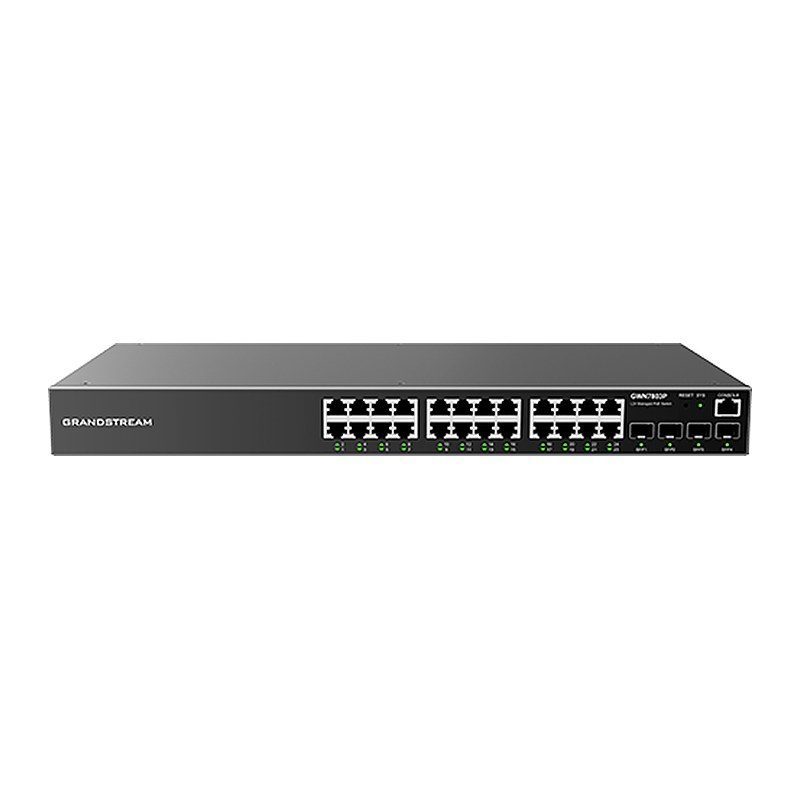
Grandstream GWN7803P Layer 2+ Managed PoE Switch, 24x GbE PoE+, 4x SFP, 370W

Part number GWN7803P
  • 24 Gigabit Ethernet ports and 4 Gigabit SFP ports
  • Smart power control with dynamic PoE/PoE+ power allocation per port: 24 IEEE 802.3af/at ports, up to 30 W per port, 370 W total
  • Supports deployment in IPv6 and IPv4 networks
  • Quaternary binding of IP, MAC, VLAN & port; ARP Inspection, IP Source Guard, DoS protection, port security & DHCP snooping
  • Advanced VLAN, IGMP/MLD Snooping and unicast routing via ACL with DHCP Server and Relay
  • Built-in QoS allows for prioritization of network traffic
  • Flexible management: embedded controller in the web UI, CLI, GDMS Networking (cloud), GWN Manager and GWN Series Routers
Price
⃁ 1,226.26 ⃁ 1,226.26 ⃁ 1,596.69 Save 23%
⃁ 1,226.26 ⃁ 1,596.69
(Tax excluded)
  • Delivery within 4–10 business days across Saudi Arabia
  • Warranty according to the manufacturer
  • Tax invoice with every order
  • Technical support before and after purchase

Not sure this model fits your setup? Read the buying guide
Overview of Grandstream GWN7803P

The Grandstream GWN7803P is a Layer 2+ managed network switch from the GWN7800 series that lets small-to-medium businesses build scalable, secure, high-performance and fully manageable networks. It provides 24 Gigabit Ethernet ports and 4 Gigabit SFP ports. All 24 ports deliver IEEE 802.3af/at PoE/PoE+ (up to 30 W each, 370 W total) for IP phones, IP cameras and Wi-Fi access points. Advanced VLANs, QoS, IGMP Snooping and security features such as ARP Inspection, IP Source Guard and DHCP snooping keep traffic organized and protected. It can be managed from its local web UI, through GDMS Networking in the cloud, GWN Manager on-premise, or GWN Series routers, making it a good fit for offices, clinics, schools, retail stores and hotels.

Technical Specifications – Grandstream GWN7803P

General

Network ProtocolsIPv4, IPv6, IEEE 802.3, IEEE 802.3i, IEEE 802.3u, IEEE 802.3ab, IEEE 802.3z, IEEE 802.3x, IEEE 802.1p, IEEE 802.1Q, IEEE 802.1w, IEEE 802.1d, IEEE 802.1s, IEEE 802.1x
Memory128 MB RAM, 32 MB Flash
Jumbo Frame (Bytes)10240

Ports

Gigabit Ethernet Ports24
1G SFP Ports4
Console1
Other Ports1 × Reset Pinhole

Power & PoE

PoE StandardsIEEE 802.3af/at
PoE Ports24
Max Output Power per PoE Port30 W
Max Total PoE Output Power370 W
Integrated Power Supply400 W
Surge Protection±6 kV CM and DM for power; ±4 kV CM for network ports
ESD±12 kV for contact discharge

Performance

Forwarding ModeStore-and-forward
Total Non-Blocking Throughput28 Gbps
Switching Capability56 Gbps
Forwarding Rate41.66 Mpps
Packet Buffer4.1 Mb
Network LatencyAvg <4 μs

Software Features

Switching8K MAC addresses, including static, dynamic, filtering and sticky MAC address; 4K VLANs, port-based VLAN, IEEE 802.1Q VLAN tagging, MAC-based VLAN, protocol-based VLAN, QinQ; Voice VLAN including auto voice VLAN, tagged OUI and untagged OUI; 16 VLAN virtual interface with 9216 MTU; 256 ARP/NDP; 8 link aggregation groups; Spanning tree, 16 instances for STP/RTSP/MSTP/PVST(+)/RPVST(+)
Routing32 (IPv4)/32 (IPv6) static routing, which supports user-defined static routing entries
MulticastIGMP Snooping with IGMPv2 and IGMPv3, 256 IGMP Snooping groups; MLD Snooping with MLDv1 and MLDv2, 256 MLD Snooping groups; MVR
QoS/ACLPort priority; Priority mapping; Queue scheduling, including SP, WRR, WFQ, SP-WRR and SP-WFQ; Traffic shaping; Rate limit; 128 ACLs for Ethernet, IPv4, and IPv6 with 1.5K total ACEs
DHCPDHCP server, DHCP relay, DHCP Option 82, 60, 160 and 43
MaintenanceCPU and memory monitoring; Fault detection and alarm for fan; SNMP including SNMPv1, SNMPv2c, SNMPv3; RMON; LLDP & LLDP-MED; Backup and restore; Syslog; Alert; Diagnostics include Ping, Ping Watchdog, Traceroute, Port Mirroring (SPAN and RSPAN), UDLD (TBD), copper testing, fiber module monitoring, and one-click debugging; Upgrade via FTPS / TFTP / HTTP / HTTPS or local upload, mass provisioning using DHCP Option / TR-069 (pending) / GDMS Networking / GWN Manager / GWN router
SecurityUser hierarchical management and password protection, HTTPS, SSH, Telnet; Identity authentication including 802.1X and MAC authentication; AAA authentication including RADIUS, TACACS+; Storm control; Port isolation, port security, sticky MAC; Filtering MAC address; IP/IPv6 source guard, DoS attack prevention, ARP inspection; DHCP/DHCPv6 Snooping; Loop protection including BPDU protection, root protection and loopback protection; Kensington Security Slot (Kensington Lock) support; Firmware signature

Physical & Environmental

LEDs1 x tri-color LED for device tracking and status indication; 28 x green LEDs for data ports; 24 x yellow LEDs for PoE ports
Fan2
EnvironmentalOperating: 0 °C to 45 °C (32 °F to 113 °F), humidity 10–90% RH non-condensing; Storage: -10 °C to 60 °C (14 °F to 140 °F), humidity 5%–95% non-condensing
Dimensions440 mm × 200 mm × 44 mm (17.32″ × 7.87″ × 1.73″) (L × W × H)
Unit Weight3.3 kg (7.28 lb)
MountingDesktop, Wall Mount, or Rack Mount (rack mounting kits included)
Package Content1 × Switch; 1 × 1.2 m (3.94 ft) AC Cable of 10 A; 1 × 25 cm (9.84″) Ground Cable; 1 × Simplified Quick Installation Guide; 1 × Regulatory Information; 4 × Rubber Footpads; 8 × Flat Head Machine Screws (M3 × 6 mm); 2 x Rack Mounting Kits
ComplianceFCC, CE, RCM, IC, UKCA

Source: Grandstream official website and datasheet. Specifications are subject to change by the manufacturer.

PRACTICAL ANSWERS

Network planning questions

Should I choose a router, a switch or an access point?

Start with the task: connecting networks, adding wired device ports, or providing wireless coverage. A single installation may need more than one device type. Share a site diagram and device list so the proposed roles and connections are clear.

Why is wireless coverage weak in some rooms?

Check the access point location, building layout, obstacles and the number of active devices. Measure coverage where people actually work before choosing extra equipment; changing the internet package alone may not address a coverage problem.

How do I select a switch for powered network devices?

List the devices to be connected and check each device’s power requirements against the switch’s per-port capability and total documented power budget. Also review uplink capacity and reserve ports for the expansion you actually expect.

Can the guest network be separated from business devices?

Define which devices and services guests should be able to reach, then check whether the router, switch and access points support the required separation. Test the resulting access rules; a different wireless network name alone is not the acceptance test.

What information helps plan a network upgrade?

Provide floor plans, current equipment models, internet connections, cabling details and peak device counts. Describe the applications that matter most and the observed problem, such as disconnections or slow local file access.

How should network performance be checked after installation?

Agree on the locations and representative workloads to test, then record wired and wireless results separately. Check connectivity, coverage and access rules during normal use, and retain a diagram and configuration backup for support.